The Patient Navigation Toolkit
A comprehensive set of navigation resources designed to standardize patient participation, engagement, and follow-through. These instruments strengthen documentation and reporting across the full care journey, reduce ambiguity, close gaps, and ease provider workload.
Who's this for?
Designed for providers who want their patients to arrive prepared, stay engaged, and complete care instructions between visits.
Physicians

Specialists

Surgeons

Practice Clinicians


Make Your Instructions Stick
Historically, patient education has been divided into two categories. The first is condition management education, delivered by licensed professionals during care. The second is lifestyle education, which patients often learn through self-research. The overlooked category is navigation education, which teaches patients how to follow instructions, organize details, and carry out the plan between visits. Patient Better brings this third category into focus so follow-through improves and visits run on clearer, more complete information.
Start Here_______________________
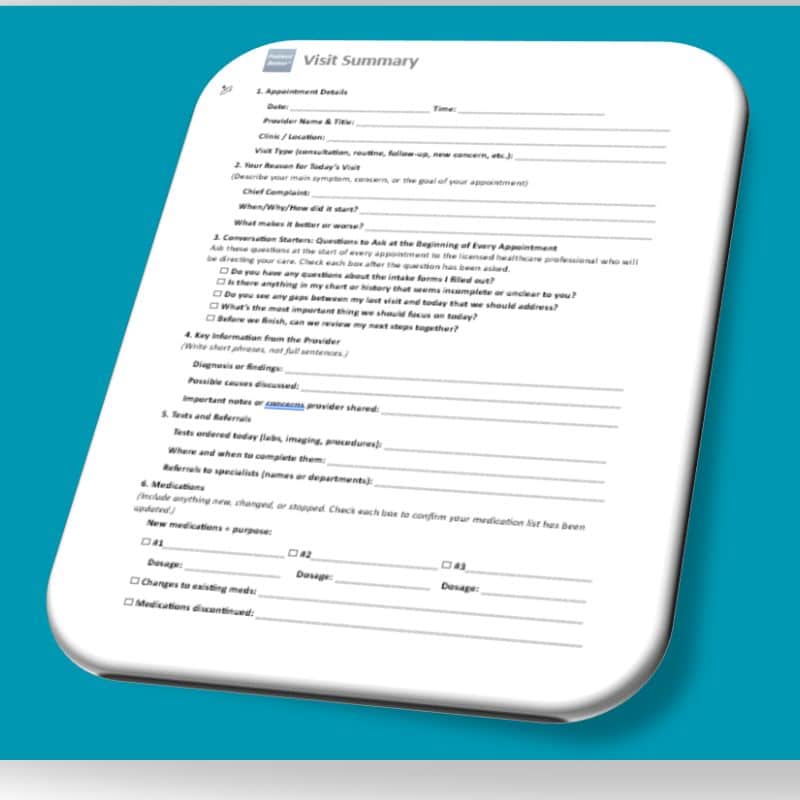
Start every patient with the Visit Summary. It gives patients a simple way to capture what you said, confirm understanding, and bring back clear next steps—so follow-up visits are faster and follow-through improves between appointments.
Need your Visit Summary in another language?
Spanish Vietnamese Tagalog Modern Standard Arabic (MSA) Korean Portuguese Chinese (Simplified)
If you don’t see your preferred language, let us know and we’ll add it.
Navigation's Core Infrastructure (Sample PDFs)
Use the Healthcare Proficiency Challenge to identify a patient’s ability and interest to manage their care before you invest deeper resources.

Use the Readiness Assessment
to confirm understanding and capacity so expectations are aligned early and follow-through improves between visits.

Use the Non-Compliance Waiver
to document barriers and limitations
clarify patient responsibility
and protect the practice when care breaks down.

The Patient Details That Save Visit Time
These are the patient’s navigation details providers don’t consistently get in a standard visit—because they live outside the chart, outside the room, or outside the patient’s memory in the moment. When patients bring this information in a structured way, visits move faster and decisions get easier.
See my patient’s full professional care team and support network.
Professional History – About
Use this template to capture a patient’s full clinical care team in one place, including specialists, contact information, and affiliations. This improves care coordination, reduces time spent reconstructing provider history, and helps ensure important details—such as portal access, diagnoses being treated, and facility connections—are accessible during every visit.
How to use it in practice:
Have the patient complete or update this form before appointments and bring it to each visit. Keep a copy in the chart or scan it into the patient record to support referrals, transitions of care, and follow-up coordination.
See my patient’s full home care team and support network.
At-Home Care Team Template – About
Use this template to document a patient’s full at-home support network in one place, including family caregivers, home health providers, aides, and other daily support roles. This improves continuity of care, reduces blind spots between visits, and helps your team understand who is responsible for care tasks, medication support, transportation, and follow-up at home.
How to use it in practice:
Have the patient or caregiver complete this form during intake, discharge planning, or care transitions. Keep it updated at follow-up visits and use it to guide care instructions, identify gaps in support, and improve coordination with home health, family members, and outside services.
Have my patient complete their medication list before they come to my office.
Medication List – About
Use this template to have patients arrive with a complete, accurate medication list—including prescriptions, over-the-counter products, vitamins, and supplements. This reduces time spent reconciling medications during the visit, prevents errors caused by missing or outdated information, and supports safer prescribing and clearer care planning across providers.
How to use it in practice:
Send this form before appointments and ask patients to bring it completed—or bring all medication bottles to verify accuracy. Review and update it during rooming or intake, then scan it into the patient record to support medication reconciliation, refills, and coordination with specialists and pharmacies.
Have my patient summarize their home research so I can address it without wasting visit time.
Research Index Cards – About
Use this template to help patients summarize what they researched at home—so you can quickly identify what they understood, what concerns they have, and what misinformation may need correction. This reduces time spent untangling internet research during the visit, improves communication, and helps you redirect the conversation toward evidence-based next steps.
How to use it in practice:
Ask patients to complete these cards before appointments when they have questions from online research, social media, or past experiences. Review the cards at the start of the visit to prioritize concerns, correct misunderstandings efficiently, and document patient-reported questions or beliefs that impact care decisions.
Have my patient bring their ER discharge summary to the appointment.
Emergency Template – About
Use this template to have patients bring their ER discharge summary to follow-up appointments so your team can quickly confirm what happened, what was ruled out, what medications were changed, and what next steps were recommended. This improves continuity of care, reduces missed follow-up actions, and helps prevent repeat emergency visits caused by unresolved issues, confusion, or incomplete transitions of care.
Some patients are more likely to return to the emergency room due to chronic conditions, limited support, low health literacy, or difficulty following care instructions. This tool helps you identify those higher-risk patients and keep a closer eye on them between visits—before small issues escalate.
How to use it in practice:
Ask patients to complete this form and bring their discharge paperwork to every post-ER follow-up visit. Review the details during intake, confirm medication changes and instructions, and document the event in the patient record. Use repeated ER visits as a cue to increase touchpoints, reinforce care instructions, and consider additional support or education.
Have my patient track symptom patterns between visits so I can make better clinical decisions faster.
Symptom Tracker Tool – About
Use this tool to help patients track symptom patterns between visits—including frequency, severity, triggers, timing, and response to medications or lifestyle changes. This reduces vague symptom reporting, improves clinical decision-making, and allows you to identify trends faster—especially when symptoms fluctuate, patients forget details, or the condition is influenced by daily routines.
This also supports better documentation by creating a clear record of symptom progression, treatment response, and reported barriers—helpful for care planning, referrals, and ongoing management.
How to use it in practice:
Assign the tracker when symptoms are inconsistent, worsening, or difficult to describe (e.g., pain, dizziness, fatigue, GI issues, migraines, mood changes). Ask patients to track for 7–14 days before follow-up visits. Review patterns during intake and document key findings to guide medication adjustments, diagnostic decisions, and next-step planning.
Have my patient bring an updated chronic conditions history to the visit.
Condition Management Template – About
Use this template to have patients bring an updated chronic conditions history to the visit, including diagnoses, symptom changes, current treatment plans, and condition-related barriers. This improves accuracy during care planning, reduces time spent piecing together history from memory, and helps you identify gaps in condition management—especially when patients see multiple providers or struggle to maintain consistent routines.
This tool also strengthens documentation by capturing patient-reported status updates in a clear, structured format—supporting better follow-up planning, referrals, and longitudinal management.
How to use it in practice:
Assign this form during intake, annual visits, medication reviews, or any time a patient has multiple conditions to manage. Ask patients to update it before follow-up appointments and bring it to each visit. Use it to confirm condition status, track changes over time, and flag areas where additional education, monitoring, or support is needed.
Have my patient give me a snapshot summary of all their appointments.
Monthly Calendar – About
Use this template to get a quick snapshot of a patient’s full appointment schedule—including visits with specialists, labs, procedures, therapy, and follow-ups. This improves care coordination, helps prevent missed appointments, and gives your team immediate visibility into what the patient is managing outside of your office—especially when care is spread across multiple systems.
This tool also reduces time spent reconstructing timelines during visits and helps you identify scheduling conflicts, care gaps, and follow-up breakdowns that can impact outcomes.
How to use it in practice:
Have patients complete this calendar monthly or before follow-up visits, especially if they have complex care schedules. Review it during intake to confirm upcoming appointments and ensure follow-ups, labs, and referrals are not being missed. Use it to guide care planning, reinforce next steps, and document coordination needs.
Have my patient map their care journey so we can align expectations early.
Treatment Plan Calculator – About
Use this tool to have patients map their care journey in a clear, structured way—so expectations are aligned early and next steps are easy to follow. This helps reduce confusion after visits, improves follow-through on treatment plans, and gives your team a shared reference point for what the patient believes is happening, what they are responsible for, and what outcomes they expect.
This tool is especially useful when treatment plans involve multiple phases, several providers, long timelines, or complex instructions that patients often misunderstand or forget.
How to use it in practice:
Assign this tool during treatment planning, diagnosis discussions, new care pathways, or post-hospital transitions. Have the patient complete it after the visit or with a caregiver, then bring it back for review. Use it to confirm understanding, clarify responsibilities, reinforce timelines, and document alignment—especially before a referral, procedure, or follow-up plan begins.
Help me see how my patient pays for care and makes decisions.
Patient Financial Perspective Tool – About
Use this tool to quickly identify how a patient pays for care and what drives their healthcare decisions—so your team can align care plans with the patient’s real-world constraints from the start. This reduces delays caused by prior authorizations, out-of-network conflicts, cost avoidance, and incomplete follow-through when patients cannot afford or access the recommended plan.
Patients typically fall into distinct decision patterns (insurance-driven, best-practice driven, convenience-driven, or experience-driven). Understanding where the patient fits helps you anticipate barriers, communicate more effectively, and guide patients toward care steps they are most likely to complete.
How to use it in practice:
Have the patient complete this tool during intake, care planning, or after a breakdown in follow-through. Use the results to guide realistic treatment planning, adjust communication, clarify expected costs, and anticipate authorization or access barriers. Document the patient’s perspective in the record so care team members can maintain consistency across referrals, follow-ups, and care transitions.
Post-Op & Recovery Tools (Samples)
These samples show how Patient Better translates post-surgical instructions into an actionable recovery plan. Each tool builds on the Visit Summary by organizing restrictions, medication guidance, therapy schedules, red flags, and tracking—so patients arrive to follow-up prepared and your team can document recovery progress clearly.





Want these templates branded for your practice?
If you’d like to use these tools inside your clinic and add them to your electronic system, Patient Better can provide a branded version customized with your practice name, logo, and formatting preferences. This helps you standardize patient preparation across your team, improve documentation consistency, and make these tools easier to assign before and after visits.
Ideal for practices that want:
- Consistent intake and visit-ready patient updates
- Templates that match internal workflows
- Forms that can be scanned, uploaded, or added to patient portals